A serious remote job search, done by hand, looks like this. Twelve tabs of job boards. A spreadsheet with columns you stop updating after the second week. A folder of résumés called resume-final.pdf, resume-final-2.pdf and resume-final-USE-THIS-ONE.pdf. A cover letter you rewrite from a template and then feel slightly ashamed of. And the moment you get a reply, you cannot remember which version of yourself you sent them.
I have been on the hiring side too, and the asymmetry is the whole problem. A company runs its side of the process as a pipeline, with stages and tooling and numbers. The candidate runs theirs as vibes and a spreadsheet. I wanted my side to be a pipeline as well, and I did not want to hand my résumé, my notes and my API keys to a job-search SaaS to get it.
What I actually wanted
The list was short and stubborn.
Crawl remote roles into a database that lives on my machine.
Tailor a résumé for each job with the AI I already pay for, whether that is a CLI subscription like Claude Code or Codex, or my own API keys, and never invent a fact about me while doing it.
Produce a real PDF I would be happy to send, in more than one style, including a plain one that gets through applicant tracking systems.
Track every application on a board with stages and honest funnel numbers, and move cards when replies arrive without me doing bookkeeping.
Never, ever submit an application on my behalf. Fill the form, stop, and let me press the button.
And one constraint above the rest: nothing leaves the machine except the direct call to the model provider I chose. Not the résumé, not the notes, not the keys. Privacy is not a feature of the tool, it is the reason for the tool.
How it works
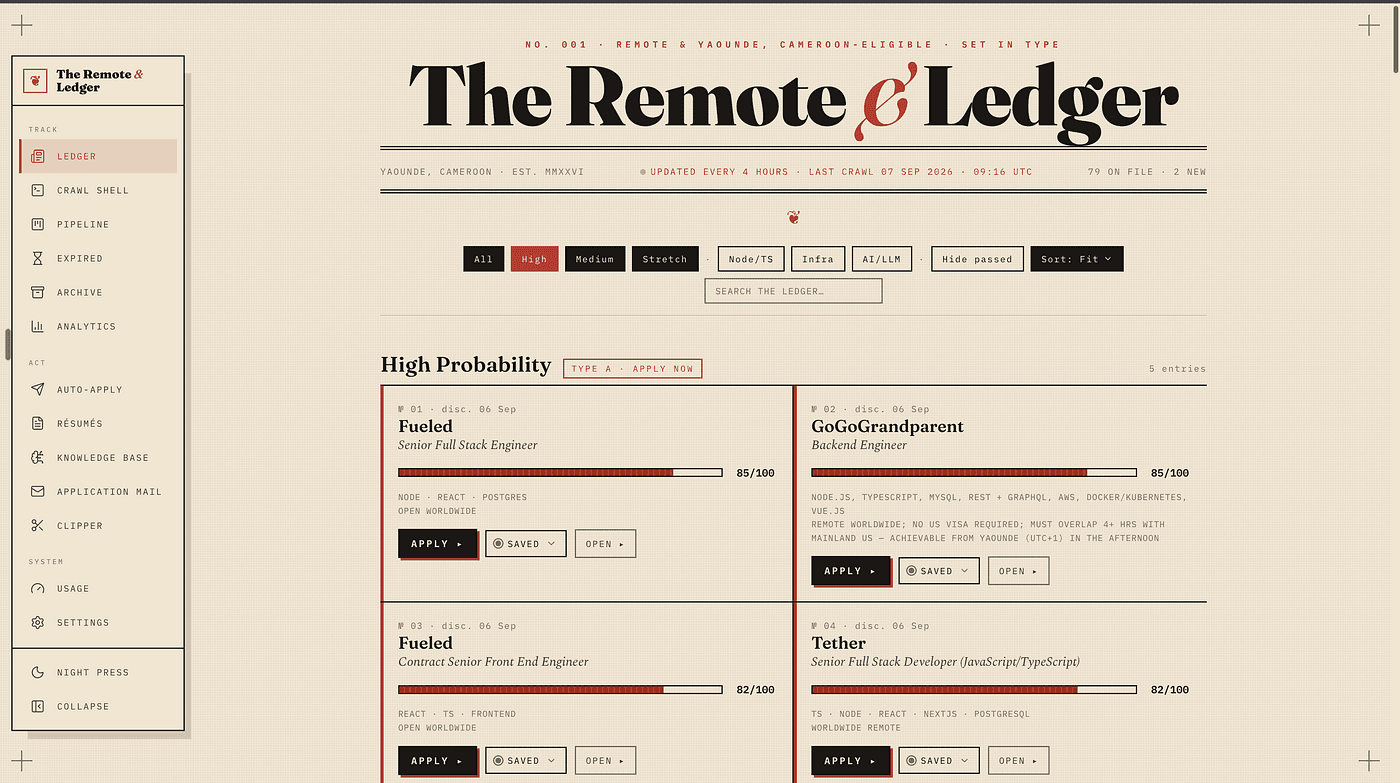
The Remote & Ledger is a local web app. You run it, it opens in your browser, and everything it knows lives in one SQLite file on disk. The front page is a broadsheet: remote roles grouped into High, Medium and Stretch by how well they fit, with a fit meter on each, filter and sort and search, and a quick stage dropdown so a job can go from saved to applied without leaving the list.
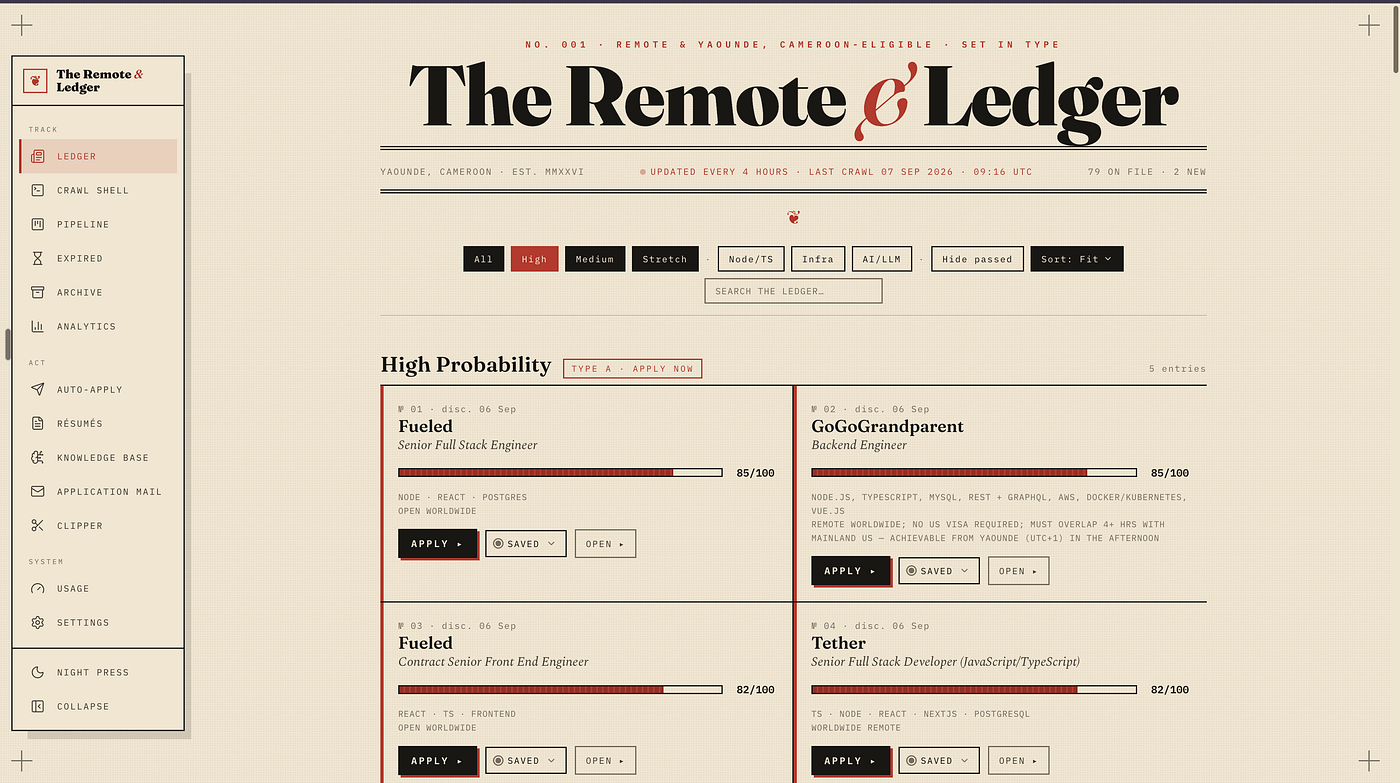
The ledger. Roles grouped by fit, set in type.
Each job has its own page, and that is where the work happens.
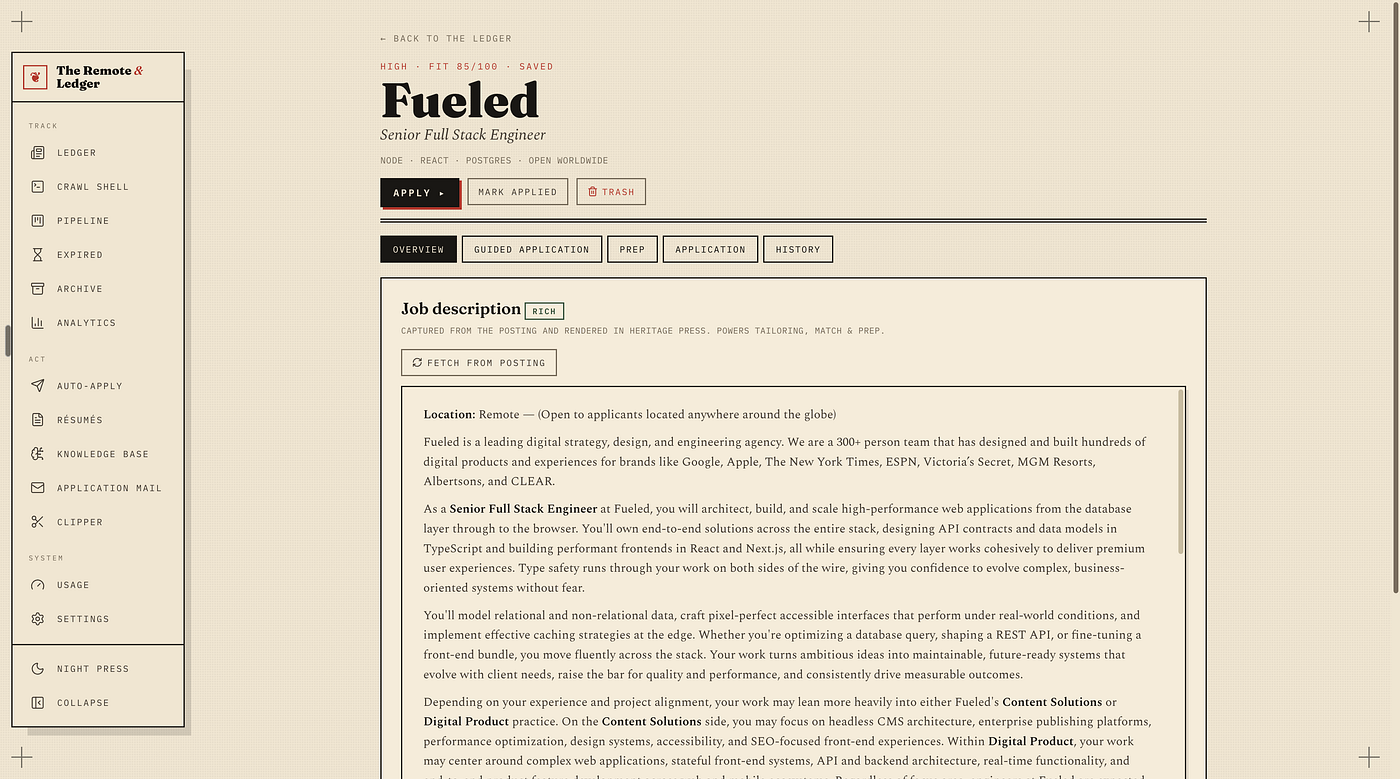
A job page: the posting as the company wrote it, reskinned. The work happens in the tabs.
The posting itself, scraped as the site's own HTML and reskinned, not flattened to text. You read the job the way the company wrote it.
Match and gap. What in the knowledge base supports this role, what is missing, and which ATS keywords are worth having in the document.
Tailor. A résumé for this job, in one of four styles, with a diff of what changed against the base version.
The guard. Every generated bullet is checked against the knowledge base before it can be accepted. Anything the model made up gets flagged, and it will make things up: a language you never used, an employer you never had, a number that sounds right. The guard catches the confident nonsense before it reaches a recruiter.
Cover letter and interview prep, from the same context, streamed live so you can watch the model think and stop it when it drifts.
Auto-apply assist. Playwright opens the application, fills the identity fields, uploads the résumé and the cover letter, and generates either of them on the spot if the form demands one you do not have yet. Then it stops. You submit.
The knowledge base is the part I am proudest of. Instead of typing facts about yourself into a form, you point it at your project folders. It reads the repositories, drafts factual bullets from what is actually there, and draws a force-directed graph of skills, projects, jobs and companies so you can see, for once, what you have really done and where the gaps are. That graph is also what the guard checks against, which is why the guard works: it is comparing the model's claims to evidence, not to another model.
Replies come in over IMAP. When a company writes back, the card moves. The pipeline view is a kanban with the usual stages and a funnel underneath it, so the numbers that matter — how many applications become conversations, how many conversations become offers — are just there, per source, without a spreadsheet.
Bring your own AI, and know what it costs
The runner layer is one interface with a dozen implementations behind it: four CLI subscriptions and seven API providers, including a local model through Ollama if you would rather nothing left the machine at all. Keys are encrypted at rest with AES-256-GCM. Every call is logged with tokens and cost, there is a usage page that shows spend by purpose and by day, and a monthly budget cap that blocks metered calls when you hit it. If you have ever been surprised by an API bill, you understand why that page exists.
Why it looks like a newspaper
It is set like a broadsheet: Fraunces and Spectral for the type, IBM Plex Mono for the numbers, ink on paper, a vermilion accent, hard offset shadows and no rounded corners anywhere. There is a dark mode called Night Press. I called the design system Heritage Press, and the reason is not decoration. A job search is a ledger. Rows, columns, dates, amounts, a running total. Making it look like one made me treat it like one.
The build
About fourteen thousand lines of TypeScript in three to four weeks. React Router 7 in framework mode, which gives me loaders and actions without a separate API. Tailwind 4, because hand-setting a letterpress system is faster without a component library arguing with you. Node's SQLite for the database, Playwright for the PDFs and the form filling, IMAP for the replies. It is MIT, on GitHub, and it runs from one command:
npm run ledger start # -> https://remoteledger.dp.localThat command installs what is missing, gives the app a real address, runs it in the background and brings it back every time you log in. The real address is the reason I wrote dropport a few months later: a hosts entry gets you a name but not a port or a certificate, and I wanted the ledger to be simply there, over HTTPS, whenever the laptop was on.
What broke
Dogfooding on the live database bit me, and it bit me exactly where it hurts. While iterating on the knowledge-base schema I ran a migration against the same jobs.db I was using for my real search. A DROP in that migration took the knowledge base with it: every bullet it had drafted from my repositories, every question it had answered, every source. The only copy was that one file.
The fix was structural, not a note to self. The app now snapshots the database before every migration. Migrations are additive by default, and a dry run prints the plan before anything executes. It is also why my own website ships nightly database dumps to object storage instead of trusting a single box: I had already learned that lesson once with a CMS, and apparently needed to learn it twice.
How it helped me
The honest answer is that it changed the shape of the work more than the volume of it.
Tailoring used to be the thing I avoided. Rewriting a résumé for one role is an hour of second-guessing, so I would send the generic one and hope. Now a tailored version with a diff and a guard report takes minutes, and I read it instead of writing it, which is a much better use of a human. The guard flagged invented facts on my own résumé in the first week — a framework I had only read about, presented as experience — and that alone justified building it.
The board did the other half. Seeing conversion numbers per source told me, quickly and without mercy, which boards were worth crawling and which were noise. Replies landing on the board on their own meant the pipeline stayed true even in the weeks I did not feel like looking at it.
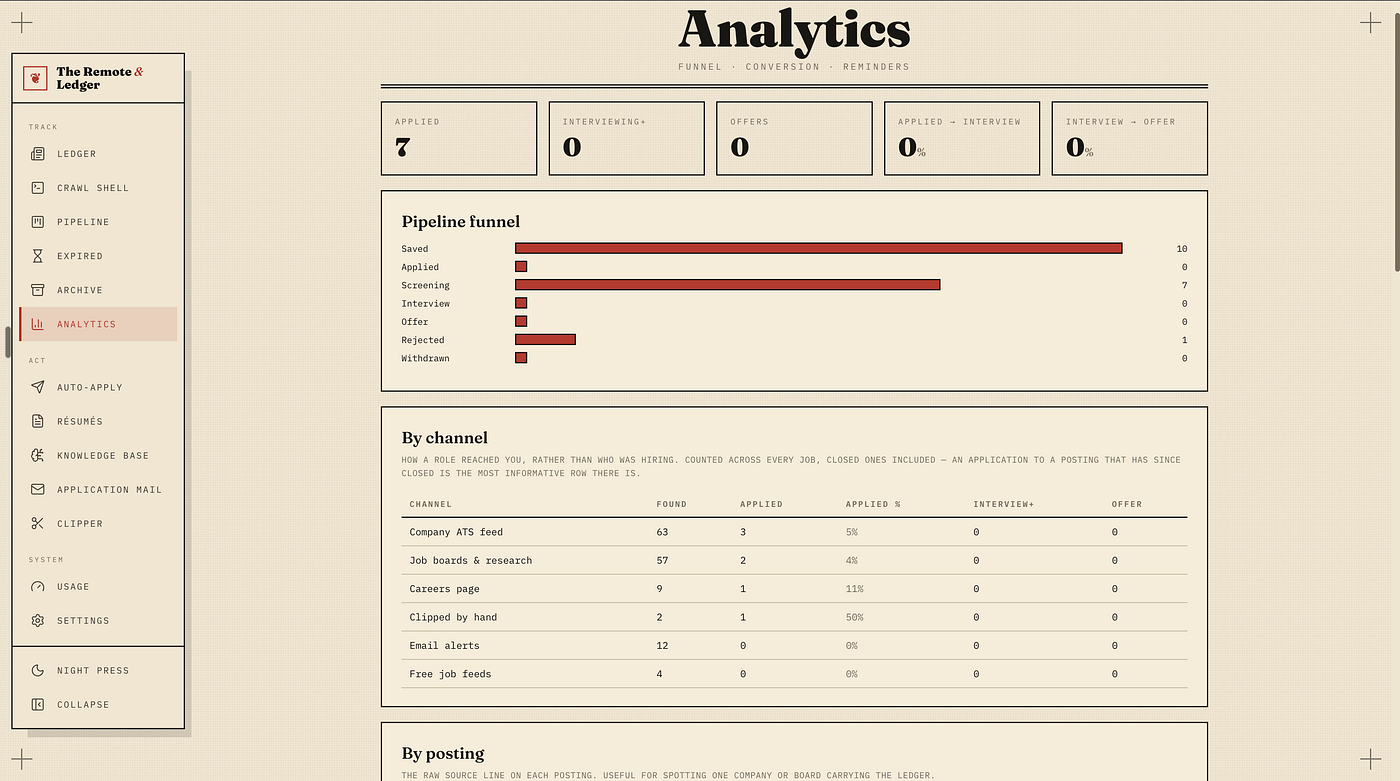
Analytics: the funnel and the by-channel table. Small numbers, true numbers.
The numbers, as of September 2026, are small and true. The ledger has found 147 roles across six channels. I have applied to 7 of them; all 7 are in screening, one posting has already come back as a rejection, and there are no interviews yet. The by-channel table already earns its keep, though: the companies' own ATS feeds and careers pages produced 4 of those 7 applications and the job boards 2, while the 12 email alerts and the 4 free job feeds produced none. Two channels I would have kept reading out of habit are now crawled less and skimmed faster, and that is the kind of decision a spreadsheet never made for me.
And it is mine. The data, the keys, the history of every version I sent to every company, in one file I can back up, inspect and delete. No dashboard somewhere else knows I am looking.
If you are running a serious remote search and you would rather it ran like a pipeline than like a spreadsheet, the code is at dark-matter08/remote-ledger. Bring your own AI. Keep your own data. Press your own submit button.
Comments
No comments yet.